

Animation
393 - ANMSDA

Mohawk College’s Animation program will provide you with the learning experiences you need to develop and create your own characters and short films and help you develop the skills you need to contribute to the growing professional and independent film making industry.
- Engage in experiential learning that will build proficiency in all aspects of animation as a storytelling art.
- Gain the skills and confidence to express your ideas and talents through the varied animation arts.
- Learn about current animation styles that embrace both 2D and 3D production methods and gain the artistic skill and fluency you’ll need to contribute to all aspects of this fantastic medium.
- Gain a solid foundation in principles of filmic storytelling and visual communication, concept design, composition 2D and 3D image construction and character animation.
- Apply principles of drawing, design, animation and composition to a progressive series of exercises, assignments and collaborative learning experiences.
- Employ a variety of hand drawn and CG processes including idea generation and planning, 3D modeling construction, rigging, texturing, lighting, and animating within industry standard animation software programs.
Program Highlights
- Bring your stories, characters and imagination to life through 2D hand drawn and 3D computer animation.
- Develop your skills in design, drawing, composition character animation, and filmic storytelling principles.
What you'll learn
Pre-production skills:
- Narrative skills to develop idea generation and entertainment through verbal and visual story structures and characters.
- Figure drawing to develop observation, research, strong drawing and character performance skills.
- Traditional drawing and ideation skills for generating visual design concepts, environments, characters, storyboards/animatics, and planning 2D and 3D animated performances.
Production skills:
- Performance animation skills and techniques that can be applied to all forms of animation.
- Computer skills for 2D and 3D digital character construction rigging and animating.
- Construction of 2D and CG props and environments with texture and lighting to complete the scene.
- Camera, rendering and editing techniques to create a finished film production.
- Experience and functional use of industry standard hardware and software.
- Transferable skills to entertainment, gaming, virtual reality (VR) commercial and industrial productions.
- Develop real-world industry production work practices.
- Understanding the business of art, self promotion profit and independent film making.
Portfolio Submission Process
Open the Admissions tab (opens new tab) to check the Academic Requirements and to submit your Portfolio.
Ready to submit your Portfolio?
Visit the Animation Portfolio Form
Still have questions? View our Frequently Asked Questions found under the More Information tab (opens new tab).
Program Length
3 academic years (periods of 8 months)
Course Overview & Descriptions
Click on the course title for a course description.
Note: Nude Models
Nude models are an essential component in every Life Drawing course within the Animation Advanced Diploma program. Students are required, as part of the curriculum, to study life drawing.
Learning Outcomes
Program Learning Outcomes, often referred to as ‘Program Standards', set out the essential learning that a student must achieve before being deemed ready to graduate.
In many cases these program learning outcomes were developed by the Ministry of Colleges and Universities (MCU) in consultation with employers and educators who are experts in the program field. To ensure the outcomes remain current and in line with industry needs, we invite our employers, graduates working in the field and current students to re-examine and update them during regular, ongoing program review focus groups.
Admission
Domestic and International student admission requirements
- OSSD or equivalent (Mohawk Academic Upgrading, GED) including:
- Grade 12 English, C or U or equivalent
Portfolio Submission
Please note that portfolios submitted without a valid ontariocolleges.ca applicant number will not be accepted or considered.
Options are available for mature applicants.
Don't have the necessary requirements?
Language Requirements for Applicants with English as a Second Language
- See below for accepted equivalents for Grade 12 English:
- Successful completion of the GAS-English for Academic Purposes (478) program
- TOEFL minimum score of 550 (80 Internet based)
- or IELTS Academic minimum score of 6.0 overall with no band less than 5.5
- or Duolingo - 105-110 (no band below 100)
- More information about acceptable certificates, can be found on the International Admission Requirements
Tuition and Fees
2026 - 2027 Domestic Tuition and Fees
| Description | Semester 1 | Semester 2 |
|---|---|---|
| Compulsory Ancillary Fees | $924.49 | $825.36 |
| Co-op Fees | N/A | N/A |
| Compulsory Program Fees | $0.00 | $0.00 |
| Domestic Tuition | $2,939.89 | $2,939.89 |
| Total Domestic Charges Per Semester | $3,864.38 | $3,765.25 |
| Total 1st Year Fees | $7,629.63 | |
Above fees based on full-time September program start date. Contact Student Services to confirm fees for other start dates or semesters.
- Full Cost Breakdown
- Explore payment options
- Book costs for your program can be found through the Campus Store
- The Animation program requires the purchase of additional software materials. These are listed under the Tech Requirements found under the More Information (opens new tab) tab.
- You will also be required to purchase a laptop (or personal computer, where deemed appropriate). Additional program-specific software and hardware may also be required. Full details will be provided in your classes or at your orientation. This is an additional cost (above tuition/ancillary fees and textbooks).
2026 - 2027 International Tuition and Fees
| Description | Semester 1 | Semester 2 |
|---|---|---|
| Total Tuition & Ancillary Fee | $9,780.00 | $9,780.00 |
| Co-op Fees | N/A | N/A |
| Program Compulsory Fees | $0.00 | $0.00 |
| International Tax Recovery | $450.00 | $375.00 |
| Total International Per Semester | $10,230.00 | $10,155.00 |
| Total 1st Year Fees | $20,385.00 | |
If you pay by wire transfer, please note your bank might charge you a fee to transfer money. Make sure your transfer includes the Mohawk payment and the wire transfer fee. This applies to each wire transfer payment you make.
- Explore payment options
- Book costs for your program can be found through the Campus Store
- The Animation program requires the purchase of additional software materials. These are listed under the Tech Requirements found under the More Information (opens new tab) tab.
- You will also be required to purchase a laptop (or personal computer, where deemed appropriate). Additional program-specific software and hardware may also be required. Full details will be provided in your classes or at your orientation. This is an additional cost (above tuition/ancillary fees and textbooks).
For potential Tuition Support
Financial Assistance
When it comes to paying for your education, investing in your future can be more affordable than you think. A Mohawk education is one of the most cost-effective means of acquiring the skills and knowledge you need to have a prosperous and rewarding career.
As you start on your chosen career path, it's important to have a realistic set of expectations regarding the expenses associated with attending college. In addition to your tuition fees, you will also need to budget for books, supplies, housing, and other related living expenses. You may be able to supplement your income and savings with scholarships, bursaries, or loans. It pays to do some research into what types of financial assistance you may qualify for.
Available Financial Assistance Resources:
 OSAP Eligible. Learn about Ontario Student Assistance Program - OSAP (domestic students only)
- Additional Sources of Funding
- Financial Assistance Home Page
Apply for Awards:
By submitting a Scholarships and Bursaries Application every semester, students have access to over $3 million in Mohawk College scholarships, bursaries and Ministry-partnered funding to help meet their financial needs.
Financial Literacy:
Whether saving for school, sticking to a budget, or planning for a major purchase, financial literacy affects us all. That's why Mohawk College is dedicated to helping students improve their financial literacy and become more confident in managing their money.
- Complete the free online Money Matters Module to earn Co-Curricular Credit!
- Financial Resources and Calculators
Experiential Learning
How you'll gain skills
- Use state-of-the art software and hardware to learn the animation process, in simulated studio environments.
- Participate in industry and/or community based projects with external stakeholders and internal college partners.
- Engage in performance-based learning through the Animation portfolio exhibit.
- Explore creative, community, and industry spaces through field trips.
- Apply cumulative program knowledge through a capstone research project.
To learn more, please visit the Centre for Experiential Learning.
Educational Pathways
Pathways to Mohawk College
If you've successfully taken a course at another post-secondary institution, you may be able to earn course exemptions toward your credential here at Mohawk College. In addition, prior learning you have achieved through work or other life experiences, outside of formal educational courses, may count towards your program through Prior Learning Assessment & Recognition (PLAR).
If you have successfully completed one of the following programs at Mohawk College, you may be eligible to receive transfer credit in this program. To start a new program at Mohawk College, you must apply via ontariocolleges.ca.
Transfer from
You can transfer to the Animation from the following programs:
Art and Design Foundations
Game - Design
General Arts and Science Certificate (College Transfer)
General Arts and Science Diploma (University Transfer)
Graphic Design
Receiving Program
Animation
Transfer to
You can transfer from the Animation to the following programs:
Game - Design
Graphic Design
Credit transfer agreements have been arranged to make it easier for students to move from Mohawk to another institution.
Transfer From Animation To
Technological University of the Shannon
University Road
Athlone
Co. Westmeath
N37 HD68
Ireland
Bachelor of Arts (Honours) Animation and Motion Design
University Road
Athlone
Co. Westmeath
N37 HD68
Ireland
Munster Technological University
Bishopstown
Cork
Ireland
Bachelor of Arts (Honours) in Animation, Visual Effects, and Motion Design
Bishopstown
Cork
Ireland
Mohawk College makes every effort to ensure the accuracy of each transfer opportunity. Please note that changes may occur in program offerings, admission requirements, and transfer credits granted by the receiving institutions. We advise all students to check with the receiving institution directly for the most up-to-date information.
Don’t see what you’re looking for? Search ONTransfer.ca for more pathways with Ontario public colleges and universities.
Mohawk College makes no warranty or endorsement of material contained within links to external websites, nor does the College assume any responsibility for the linked website or its contents.
Additional Information
Student Animation Art
View more at the Mohawk College Student Animation website
Dear Mohawk Animation 393 Students,
As September approaches, we want to ensure you are ready to get started on September 8, 2026, and welcome you to Mohawk College for Orientation Day.
Our hope is to spend the entire first week of classes getting everyone oriented with CANVAS, our Program Delivery interface, and get you set up with the software you’ll be working with this year. To do this we’ll need you to arrive on the 3rd with your laptop and tablet in hand so we can help you get everything in place for the year.'
Program Advisory Committee
Program content is enhanced through consultation with industry leading professionals sitting on our Program Advisory Committee:
- Rex Grignon – Creative Lead across Pixar, Dreamworks, Nimble Collective, and Amazon
- David Soren – Director, Writer and Story Artist at DreamWorks
- Victoria Neal – 2D Producer, Pipeline Studios
- Evan Bonifacio – Animator known for work on Incredibles 2, Brave, and Inside Out
- David Pietila – Layout Supervisor at Brownbag Films
- Lavio Fidelis – Gameplay Animator at Ubisoft Toronto
- Joe Giampapa - Studio Head of Story at House of Cool Inc.
Tech requirements
Software and Hardware Requirements
The Animation program has a mandatory laptop requirement. All students are required to have a laptop that is capable of effectively running the software packages that we use for instruction. This provides our students with 24/7 access to industry-relevant production tools and learning resources.
The requirement of an approved media-capable laptop is foundational to our learning structure and is necessary upon program entry. We have updated our policy to include laptops capable of meeting our required software specifications.
Minimum and recommended workstation laptop configurations for Fall 2026
Windows workstation laptop: (costs will vary based on your personal budget and choices This list is a minimum Hardware requirement)
- OS: Windows 10 or 11 (64-bit)
- CPU: Intel 12th Gen i7 or better (or AMD Ryzen 7 equivalent)
- GPU: Nvidia RTX 3050 or better (or AMD Radeon RX equivalent) (4GB – 6 GB)
- RAM: 32GB recommended – to future proof your Laptop capacity
- Internal storage: 500GB or greater SSD
- 15 - 17 in Screen (your Preference)
Important Note: Basic PC laptops and Chromebook devices will not be able to run the required professional media-industry software that our students will use regularly during each semester of the Animation program. The necessity of a machine that contains a dedicated GPU cannot be overstated.
It should have a dedicated graphics card with a minimum of 4GB of vRAM on the card (6GB will give a bit more time to grow into a 3rd-year project but 4 will get you there). This can be either Nvidia or AMD GPU. There are others but our software is programmed to take advantage of these 2 cards.
- CPU - should be an Intel i7 (13th gen or newer) or AMD Ryzen 7 7735HS (or newer)
- RAM - 16 GB DDR4 minimum
- STORAGE - 512 GB minimum
Some Other Things to Think About When Purchasing
We are a Windows program, but we can use Apple computers, however you may need to manage hardware and program software issues on your own.
The laptop should have a minimum screen size of 15" (some students have tried to use smaller, but this is usually because they have a big tower at home to work on and they do not have a good time in class). 17" is what they will try to sell you at the store and they are lovely to work on but no fun lugging around, require an oversized backpack, and consume a lot of energy - 15 works pretty well but you should spend as much time as possible playing on them in store before choosing as it will be your best/most frustrating friend for the next 3 years.
Shop around: The school has ties to Dell and offers a discount for students and staff but it would be good to do a bit of looking around. If you see something on Bestbuy.ca that looks good, do another quick search on reviews and comparisons (most of the time, you can just start typing the model into Google and then type 'vs.' and it will suggest many alternatives - these are worth a quick look.
There will always be folks who have bad experiences with a particular model but it's good to get a broader sampling of reviews.
Software Requirements
ToonBoom
Yearly subscriptions for both Harmony Premium and Storyboard Pro can be purchased from the ToonBoom website (check the box for “Student pricing”). The combined student cost to purchase both programs is $399 Annually at Approx $26/month. Required for all 3 years. It is more expensive to purchase the Software subscription monthly.
This software purchase is mandatory. Visit ToonBoom's shop.
Autodesk Education Suite for Entertainment Creation:
Create an account on the Autodesk site. Be sure to enter Educational Role – Student for 1-year free access. Download and install: Maya. If you have difficulties loading Maya on your laptop, we can help you at classes during Week 1.
This software download is free and is mandatory.
Affinity
Download the free version of Affinity
This software download is free and is mandatory.
Krita Paint Program
Download the free version of Krita from https://krita.org/en/ (current version is 5.2.16)
This software download is free and is mandatory.
Microsoft Office: Download at no cost through your Mohawk College student account.
Support Hardware:
(cost will vary based on your personal budget and choices)
- Personal External Storage:
- Minimum capacity: 1TB
- Technology: solid-state drive (SSD)
- Read/Write Speeds: approximately 500MB/second or greater (USB 3.1 or better)
- Connector: USB-A or USB-C connector as required to interface with your laptop
- USB Flash Drive – For File Backup - Minimum capacity: 64GB
- Digital display tablet (so you can see the strokes you are drawing directly under your stylus). Wacom, XP-Pen, and Huion all make these kinds of tablets. Look for one that suits your portable needs.
- External Mouse – 3 buttons with the ability to scroll for easy navigation and manipulation within the software. (Wireless mouses can cause glitches in navigating software)
- USB Microphone – If your laptop doesn’t have one, for any online classes.
- Webcam - If your laptop does not have one built-in
- Must have access to a scanner. (There are some available at the College). (There are some available at the College)
To Access Mohawk's Custom Online Store:
Mohawk College currently has a partnership agreement with Dell. We recommend that you shop on Mohawk's Custom Online Dell Store to receive educational discounts when purchasing your new Laptop. If you already own a laptop which meets our minimum standard necessary to run the required software, a new purchase will not be required.
- Login to your MyMohawk account with your MohawkID and password.
- Click on the Technology Solutions tab.
- Navigate to the Computer Store and click “Online Dell Store.”
- Once you arrive at the Mohawk College Discount Store webpage, select “Shop Your Standard Configuration” to see the list of laptops we recommend for this program.
For physical art supplies you may want to consider renting a locker in F Wing, so you don’t have to cart all your materials around. Lockers can be rented at mohawk.bookware3000.ca/services/rent-a-locker. The cost is approximately $25 for the year. Login to the above site using your MyMohawk credentials.
Please look through the Materials and Tech Requirement list and do your best to come prepared. If you have any questions, please contact: todd.jahnke [at] mohawkcollege.ca (Todd Jahnke) or charlie.bonifacio [at] mohawkcollege.ca (Charlie Bonifacio).
Looking forward to seeing you all September 3rd !
Art Kit Material Required for Semester One
- Can be purchased at Curry's, Walmart, Staples, Amazon etc.
- Many of these materials will need to be replenished from semester to semester.
- Mohawk College makes every effort to keep all our educational costs to a minimum; these costs are subject to change.
- Materials will be added during the year for individual Art and Drawing Assignments.
Art Kit Material Cost is approximately $100.00 for Semester 1.
| Material | Quantity | Approximate cost |
|---|---|---|
| Black felt marker medium & fine | 2 | $10.00 |
| Black ballpoint pen fine | 4-5 | $10.00 |
| Graphite pencil 2B | 5 | $2.00 ($10.00) |
| China marker black – Berol | 12 | $16.50 |
| China marker red – Berol | 2 | $1.00 ($2.00) |
| Sketchbook 7" x 10" or 9" x 12" | 1 | $8.00 - $20.00 |
| Small Notebook (for keeping lecture notes) | 1 | $5 - $12 |
| Newsprint pads (continuous supply through the Semester) | 6 | $30.00 |
Required Software – Purchase a 1 Year Subscription, billed monthly after Week 1
| Animation and Image Software | Quantity | Approximate Cost |
|---|---|---|
| ToonBoom – Harmony Premium & Storyboard Pro | 1 Year | $399 (tax inc.) |
Career Opportunities
Your future career options
Graduates of our program will develop the knowledge, skills, and competitive portfolio that will enable them to work as:
- Animator (2D & 3D)
- Character designer, modeler, rigger
- Storyboard artist
- Environment designer, modeler
- Concept artist
- Texture artist
- Effects artist
- Director
- Producer
Where you could work includes:
Graduates of our program will work in animation across a variety of industries including:
- Feature film
- Television
- Gaming
- AR/VR
- Advertising /promotional
- Architecture
- Education
Discover more about Animation - 393
Bring characters and stories to life
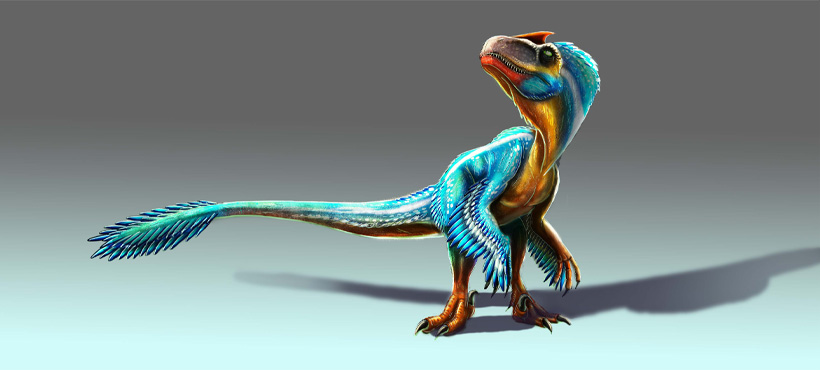
Get an inside look at our Animation program through the eyes of our students. They'll tell you what they love about our expert faculty (some worked on SpongeBob and at Disney!), the hands-on learning that covers everything from drawing to 3D, and the small class sizes that ensure you get the support you need. Learn how our students are preparing to turn their childhood dreams into a vibrant career.
Lavio Ribeiro Fidelis Neto wins Ubisoft Toronto Live NEXT Awards!
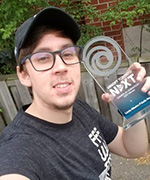
Mohawk 3D Animation student Lavio Ribeiro Fidelis Neto has been announced as winner of the much coveted Ubisoft Toronto Live NEXT Awards, claiming 1st place winner in the Gameplay Animation category. Beating out all entrants from animation programs through out Ontario, Lavio will have a paid internship with Ubisoft Toronto. Ubisoft judge and Team Lead Animator Michael Rivera says Neto presents a great display of dynamic posing, body mechanics, and presentation of the character from start to finish, leading him to the first-place spot.
To view more of Lavio’s work please visit Lavio's artstation.

We're here for you to support applications and admissions by providing online and virtual services.
General Inquiries
Please call (905) 575-1212.
Applied and have questions?
Email Admissions or Book an appointment in person or by phone.
Haven't applied and need help?
Email Recruitment or Book an appointment in person or by phone.
Applied as an international student?
Take a Virtual Campus Tour
Explore Mohawk College from the comfort of home! Our virtual campus tours provide a guided visit of our buildings, labs, services, classrooms and athletic and recreation centre.
Program Delivery
Learn about program delivery terms.
Please note: in-person, virtual, and hybrid classes vary according to the program and some programs may be in-person only. Refer to the Program Overview for more information.
Personalize your Mohawk experience
Explore programs, select your interest and create your custom viewbook. Get the information you want. Instant, online and delivered to your inbox.

Student stories

Student-made video helps demystify starting an apprenticeship in Ontario
Ready to apply?
If you are a Domestic or Canadian applicant, you can apply through the Ontario College Application System.
You are considered a Domestic applicant if you are a Canadian citizen or a permanent resident that resides inside or outside of Canada.

Contact us
Domestic Canadian Students
Contact Student Recruitment
Haven’t applied yet and have questions?
Contact our Student Recruitment team for information on programs, how to apply, and more.
Contact Admissions
Contact our Admissions advisors for help with your application.
Email Admissions
Book an Appointment ⤻
Phone: (905) 575-1212
International Students
Contact International Student Recruitment
Contact our International Student Recruitment team for information on programs, how to apply, and student life.
Contact International
Email: intl.representatives@mohawkcollege.ca
Phone: 1-905-575-2254
Toll free phone numbers:
For general questions: 1-888-Mohawk9 (1-888-664-2959)
Contact International Admissions
Contact our Admissions advisors for help with your application.
Contact International Admissions
Phone: 1-905-575-2254
*Not all programs are international eligible. Please see our programs available for international students.
Program Coordinator

Charlie Bonifacio
Accessible Learning Services
Are you a student with a confirmed or suspected disability? Visit our Accessible Learning Services website to discover how we can help you.
